> ## Documentation Index
> Fetch the complete documentation index at: https://destek.leaderos.com.tr/llms.txt
> Use this file to discover all available pages before exploring further.

# Shopier

Öncelikle Shopier'e başvuru yapınız ve hesabınızı aktif ediniz. Daha sonra aşağıdaki işlemleri yapabilirsiniz.

<Warning>
  Shopier sanal pos hizmetini durdurma kararı almıştır. Fakat sizler için Shopier modülünü geliştirdik. Bu modül sayesinde Shopier mağazanızı LeaderOS ile entegre ederek ödeme alabilirsiniz. Detaylı bilgi için: [Shopier Modülü Entegrasyon Rehberi](/integrations/shopier)
</Warning>

<Accordion title="Eski Kurulum (Artık Kullanılmamaktadır)">
  <Steps>
    <Step title="Shopier hesabınza giriş yapınız." />

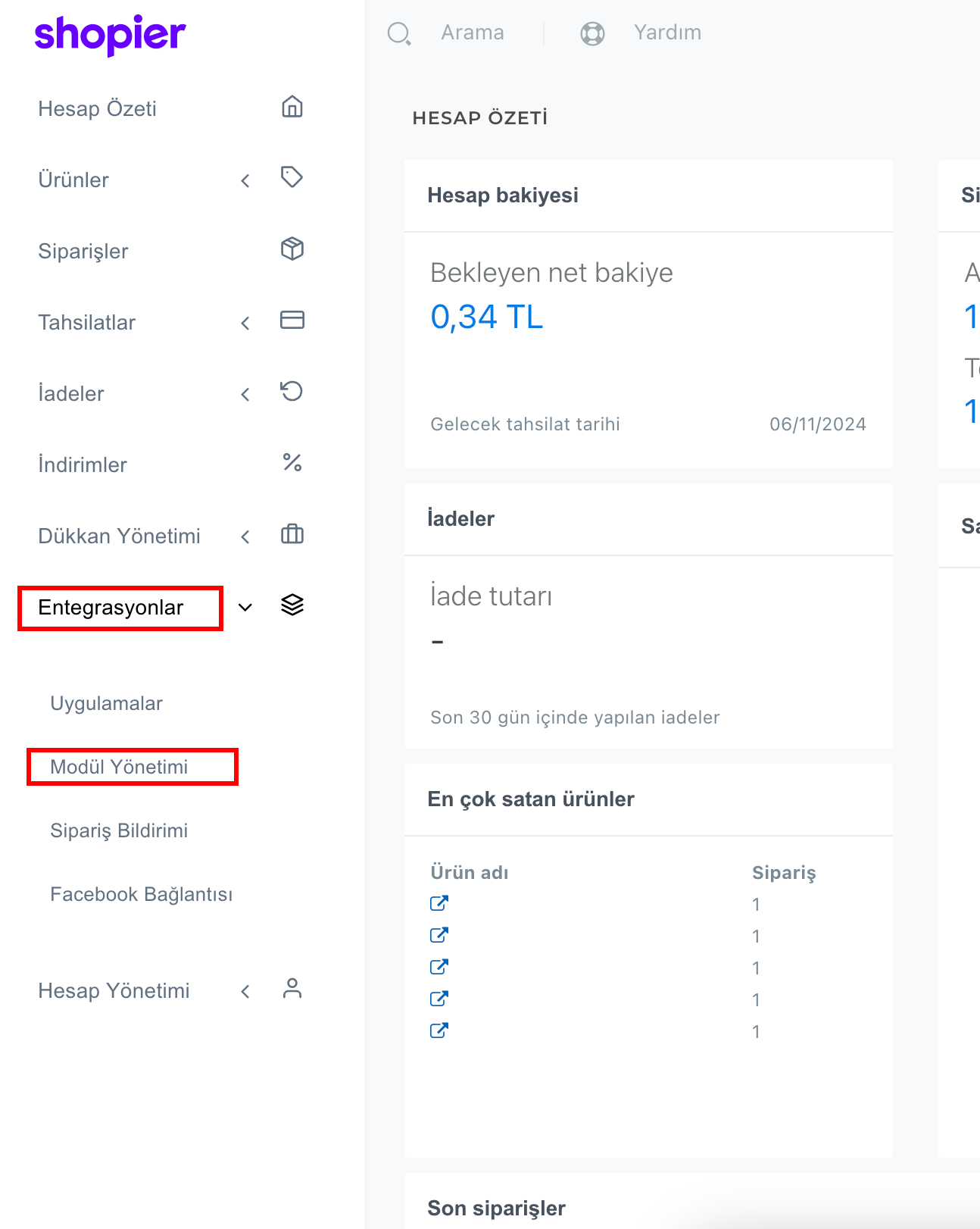
    <Step title="Shopier Panelinde sol tarafta bulunan menüden Entegrasyonlar > Modül Yönetimi sayfasına gidiniz.">
      <img src="https://mintcdn.com/leaderostrkiye/eM8LNAVfm7dQDW90/images/settings/payment-methods/shopier-sidebar.png?fit=max&auto=format&n=eM8LNAVfm7dQDW90&q=85&s=f2f6a4af723cd3f7fef4cc14a02e50b1" alt="Image" width="1294" height="1622" data-path="images/settings/payment-methods/shopier-sidebar.png" />
    </Step>

    <Step title="Shopier Modül Yönetimi sayfasında Kayıtlı alan adınızı kontrol ediniz.">
      Alan adınız doğru değilse veya yoksa aşağıdaki görsel gibi bir kayıt ekleyiniz.
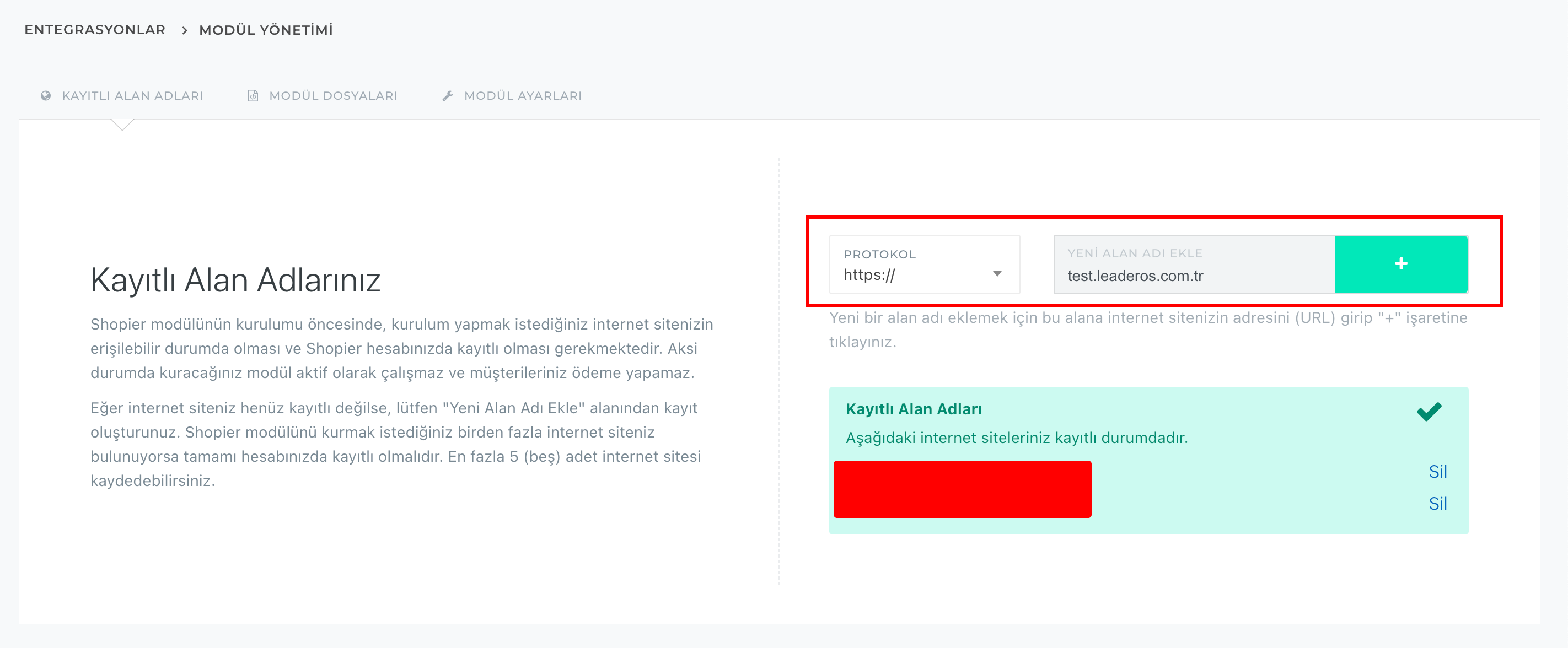
      <img src="https://mintcdn.com/leaderostrkiye/eM8LNAVfm7dQDW90/images/settings/payment-methods/shopier-domains.png?fit=max&auto=format&n=eM8LNAVfm7dQDW90&q=85&s=88ba80f3f77b3aee192cc96d2b0c8573" alt="Image" width="2844" height="1176" data-path="images/settings/payment-methods/shopier-domains.png" />
    </Step>

    <Step title="Shopier API bilgilerini websitenize giriniz.">
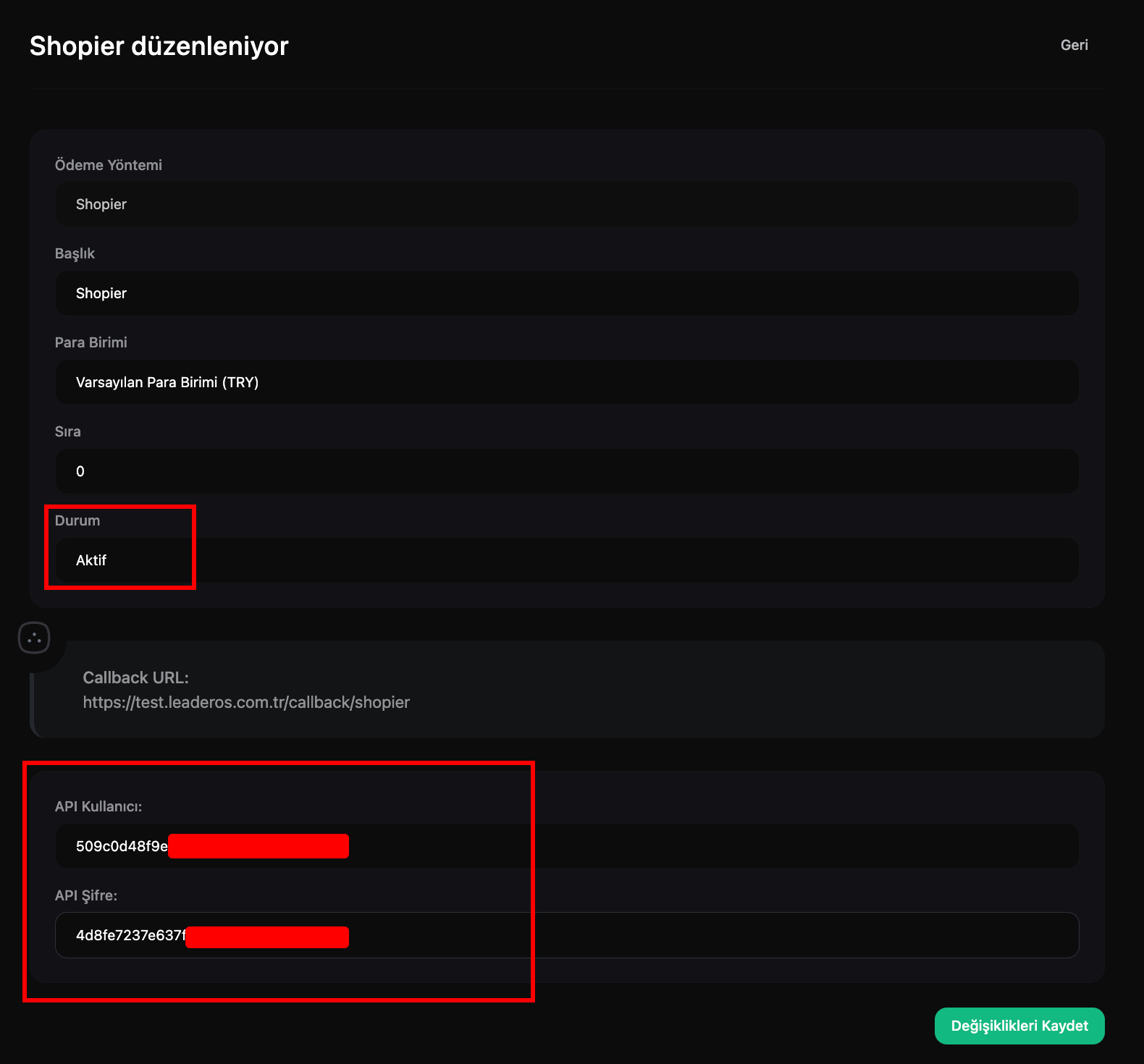
      **Shopier > Entegrasyonlar > Modül Yönetimi > Modül Ayarları** sayfasına gidiniz. API Kullanıcı, API Şifre bilgilerini websitenizdeki **Yönetim Paneli > Ayarlar > Ödeme Yöntemleri** sayfasındaki Shopier'i aktif edip bilgileri doldurunuz.
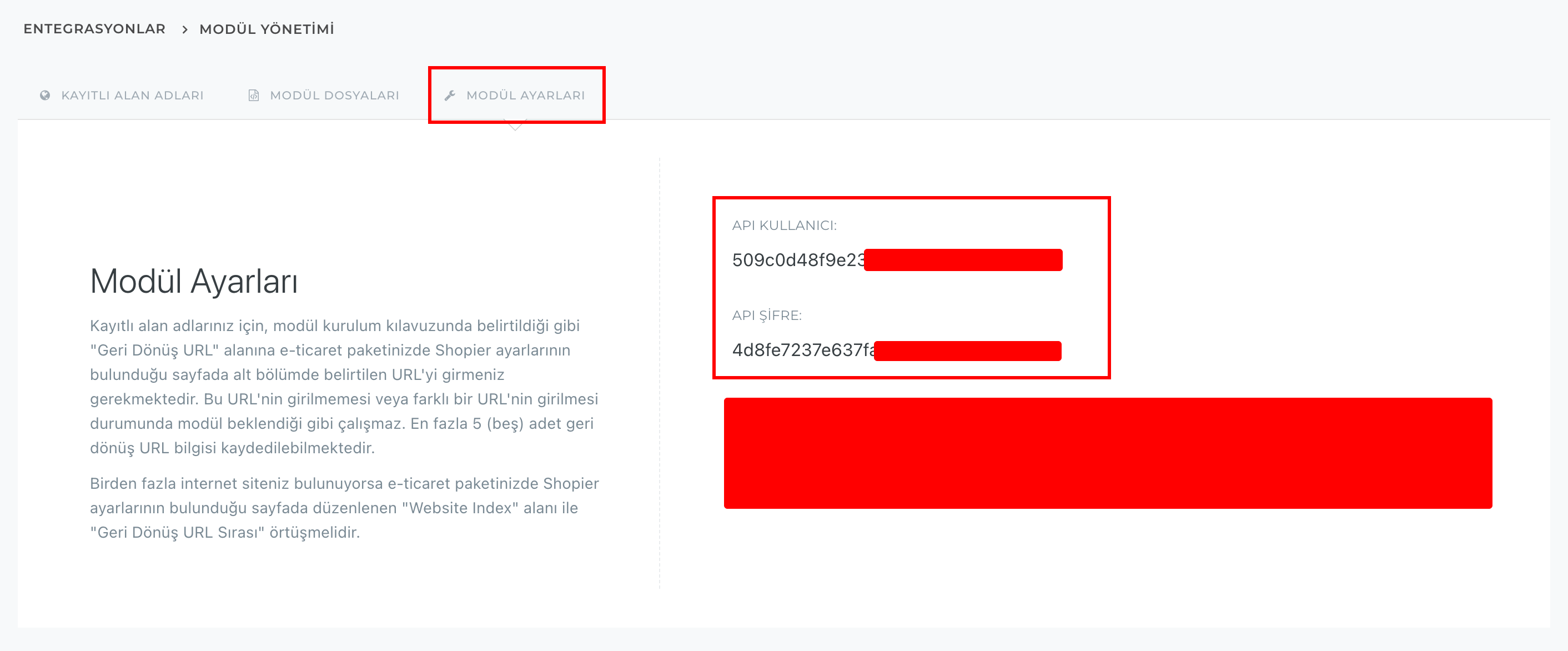
      <img src="https://mintcdn.com/leaderostrkiye/eM8LNAVfm7dQDW90/images/settings/payment-methods/shopier-bilgiler.png?fit=max&auto=format&n=eM8LNAVfm7dQDW90&q=85&s=45c6d836785e5d7b21c424072927dae1" alt="Image" width="2824" height="1172" data-path="images/settings/payment-methods/shopier-bilgiler.png" />

      <img src="https://mintcdn.com/leaderostrkiye/eM8LNAVfm7dQDW90/images/settings/payment-methods/shopier-bilgileri-leaderos.png?fit=max&auto=format&n=eM8LNAVfm7dQDW90&q=85&s=d21f12360f6c578e1eee1615456cef5c" alt="Image" width="1580" height="1470" data-path="images/settings/payment-methods/shopier-bilgileri-leaderos.png" />
    </Step>

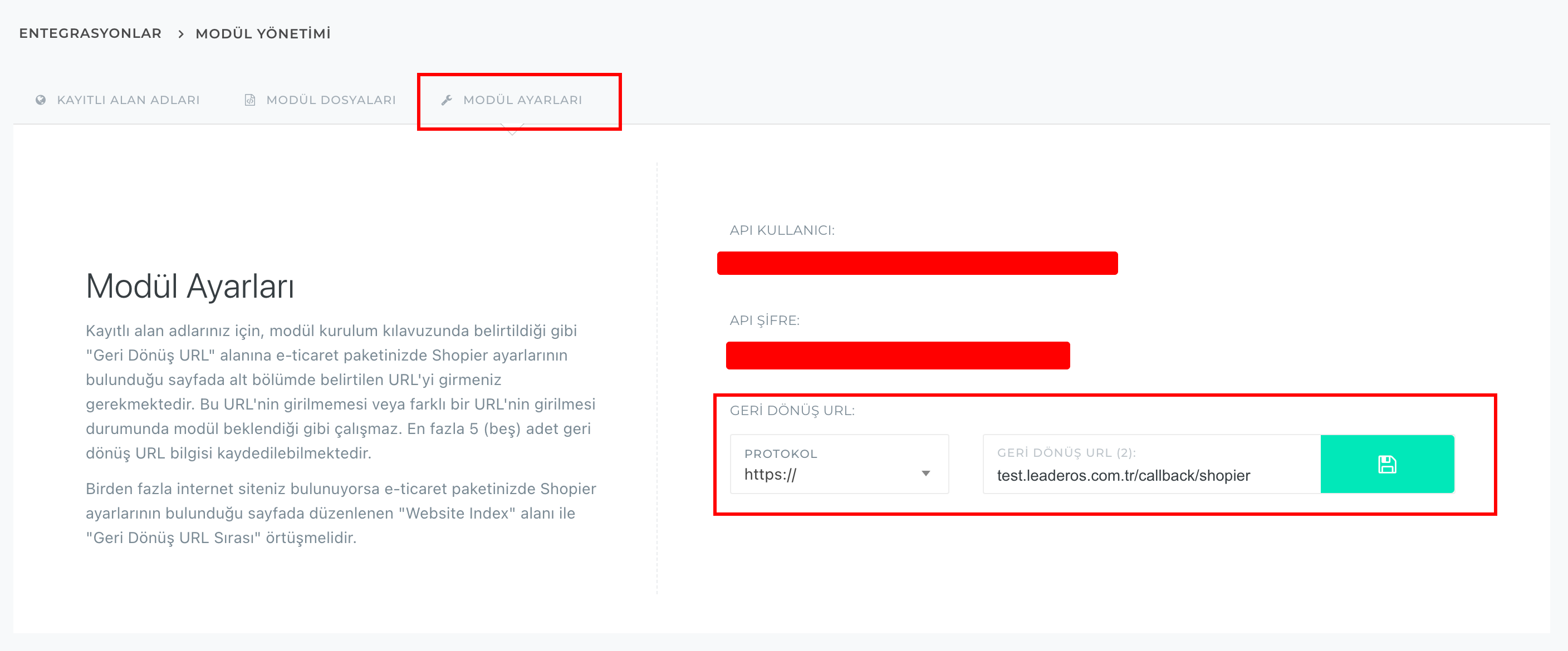
    <Step title="Shopier Geri Dönüş URL'yi ayarlayınız.">
      Shopier panelinde **Entegrasyonlar > Modül Yönetimi > Modül Ayarları** sayfasındaki **"Geri Dönüş URL"** alanına, websitenizdeki **Yönetim Paneli > Ayarlar > Ödeme Yöntemleri > Shopier** sayfasındaki Callback URL'yi giriniz.

      <img src="https://mintcdn.com/leaderostrkiye/eM8LNAVfm7dQDW90/images/settings/payment-methods/shopier-callback-leaderos.png?fit=max&auto=format&n=eM8LNAVfm7dQDW90&q=85&s=1c4cbe40222866e9e1c1078208f5a457" alt="Image" width="2120" height="298" data-path="images/settings/payment-methods/shopier-callback-leaderos.png" />

      <img src="https://mintcdn.com/leaderostrkiye/eM8LNAVfm7dQDW90/images/settings/payment-methods/shopier-callback.png?fit=max&auto=format&n=eM8LNAVfm7dQDW90&q=85&s=f664fab3a5b5f18253fe6829deffd0e1" alt="Image" width="2816" height="1170" data-path="images/settings/payment-methods/shopier-callback.png" />
    </Step>
  </Steps>
</Accordion>
